
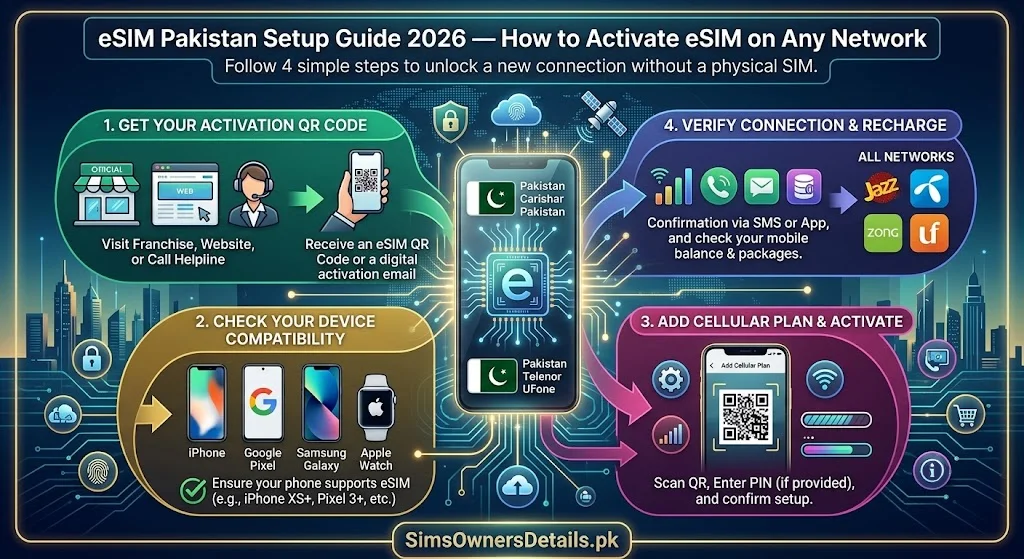
eSIM technology has arrived in Pakistan — and with all four major operators now offering eSIM services, Pakistani mobile users can finally leave physical SIM cards behind. An eSIM (embedded SIM) is a digital SIM built directly into your device — no physical card to insert, no tray to eject, no risk of losing a tiny piece of plastic. Everything your traditional SIM does, eSIM does — but digitally, faster, and with the added ability to store multiple operator profiles on a single device.
This guide covers everything about eSIM in Pakistan in 2026: how eSIM works, which devices support it, which operators offer it, the complete activation process for each network, how eSIM registration works with PTA and NADRA, and how eSIM affects your CNIC’s SIM quota and 668 monitoring.
Quick Answer: To get an eSIM in Pakistan, visit any franchise of Jazz, Zong, Telenor, or Ufone with your original CNIC and a compatible device. You will receive a QR code to scan, which activates the eSIM on your device — no physical SIM card required.
What Is an eSIM and How Does It Differ From a Physical SIM?
An eSIM (Embedded Subscriber Identity Module) is a SIM profile stored digitally in a chip permanently soldered inside your device — unlike a physical SIM which is a removable card.
Key Differences:
| Feature | Physical SIM | eSIM |
|---|---|---|
| Form factor | Removable plastic card | Built into device permanently |
| Activation method | Insert at franchise | QR code scan or operator app |
| Carrier change | Requires new physical SIM | Switch profiles digitally |
| Multiple carriers | One SIM per slot | Multiple profiles, one active at a time |
| Risk of loss/damage | Possible (physical card) | None — embedded in device |
| Registration with PTA | Biometric at franchise | Biometric at franchise + QR activation |
| CNIC count impact | Counts as 1 of 5 SIMs | Counts as 1 of 5 SIMs |
| NADRA biometric required | ✅ Yes | ✅ Yes |
| Works with 668 | ✅ Yes | ✅ Yes |
| Works with cnic.sims.pk | ✅ Yes | ✅ Yes |
The critical similarity: Despite the digital format, an eSIM is regulated identically to a physical SIM by PTA. It requires biometric verification at a franchise, counts toward your CNIC’s 5-SIM quota, and appears in your 668 check results exactly like any physical SIM.
Which Phones Support eSIM in Pakistan?
Before starting the eSIM setup process, confirm your device is eSIM-capable. Not all smartphones support eSIM.
Apple iPhone — eSIM Supported Models:
- iPhone XS, XS Max, XR (2018) — and all later models
- iPhone SE 2nd generation (2020) and SE 3rd generation (2022)
- iPhone 11, 12, 13, 14, 15 series — all models support eSIM
- iPhone 14 (US model) and iPhone 15 (all models) are eSIM-only — no physical SIM slot
Samsung Galaxy — eSIM Supported Models:
- Samsung Galaxy S20 series and later (S21, S22, S23, S24)
- Samsung Galaxy Z Fold series and Z Flip series
- Samsung Galaxy Note 20 Ultra
Google Pixel — eSIM Supported Models:
- Google Pixel 3, 3a and later
- Pixel 4, 5, 6, 7, 8 series
Other Android Devices:
- Most flagship Android devices released after 2020 support eSIM
- To check: go to Settings → About Phone → SIM Status or search your device model + “eSIM support”
How to Check If Your Phone Supports eSIM:
On iPhone: Settings → Cellular → Add Cellular Plan. If this option exists, eSIM is supported.
On Android: Settings → Network & Internet → SIM Cards or Mobile Network. If “Add eSIM” or “Download eSIM” appears, your device supports it.
How eSIM Registration Works With PTA and NADRA
eSIM registration in Pakistan follows the same biometric verification framework as physical SIM registration — with one additional technical step:
Step 1 — Franchise visit (same as physical SIM): You must visit your operator’s franchise in person. eSIM activation cannot be done entirely remotely in Pakistan — biometric verification (fingerprint against NADRA’s database) is mandatory.
Step 2 — CNIC and biometric verification: Your CNIC is entered into the registration terminal. You complete fingerprint biometric verification exactly as you would for a physical SIM.
Step 3 — PTA CSRS registration: Your eSIM profile is registered in PTA’s Centralized SIM Registration System under your CNIC — identical to a physical SIM registration. This means the eSIM appears in your 668 checks and cnic.sims.pk results.
Step 4 — QR code generation: Instead of receiving a physical SIM card, you receive a QR code (printed or displayed on the franchise terminal). This QR code contains your eSIM profile data.
Step 5 — Device activation: You scan the QR code on your device, which downloads the eSIM profile and activates it on your phone.
The CNIC quota impact: An eSIM counts as one of your 5 PTA-allowed SIM registrations exactly like a physical SIM. An eSIM + 4 physical SIMs = 5 total (at your limit). An eSIM does not get any special quota treatment.
For complete guidance on how eSIM registrations appear in Pakistan’s SIM database and how to monitor them alongside physical SIMs, visit our Pakistan SIM database guide.
How to Activate eSIM on Jazz — Step by Step
Jazz offers eSIM activation at Jazz Xperience Centres for compatible devices.
Prerequisites:
- Jazz eSIM-compatible device
- Original CNIC (biometric required)
- Stable internet connection on your device during activation
- Your device must be unlocked (not carrier-locked to another network)
Step-by-Step Jazz eSIM Activation:
Step 1: Visit any Jazz Xperience Centre. Inform the representative: “I want to activate an eSIM on my device.”
Step 2: The representative confirms your device is eSIM-compatible by checking the device model.
Step 3: Provide your CNIC for entry into the Jazz registration terminal.
Step 4: Complete biometric fingerprint verification (same process as any SIM registration).
Step 5: The representative generates a QR code for your Jazz eSIM profile.
Step 6: On your device:
- iPhone: Settings → Cellular → Add Cellular Plan → scan the QR code
- Android: Settings → Network & Internet → SIM Cards → Add eSIM → scan QR code
Step 7: Your device downloads the Jazz eSIM profile. This takes 30–60 seconds with a stable internet connection.
Step 8: Label the plan when prompted (e.g., “Jazz Personal” or “Jazz Data”).
Step 9: Your Jazz eSIM activates and appears as a cellular plan alongside any existing SIM.
Verification: After activation, check that the Jazz eSIM appears in your device’s SIM settings and that signal is showing. Then verify via 668 after 60 minutes — your new eSIM number should appear in your CNIC’s SIM list.
How to Activate eSIM on Zong — Step by Step
Zong offers eSIM services at Zong Service Centres, with a particular advantage for 5G-capable devices.
Step-by-Step Zong eSIM Activation:
Step 1: Visit any Zong Service Centre with your original CNIC and eSIM-capable device.
Step 2: Request eSIM activation from the representative.
Step 3: Device compatibility check — the representative confirms your model supports eSIM.
Step 4: CNIC entry and biometric fingerprint verification at the Zong terminal.
Step 5: The representative generates a Zong eSIM activation QR code.
Step 6: On your device:
- iPhone: Settings → Cellular → Add Cellular Plan
- Android/Samsung: Settings → Connections → SIM Manager → Add mobile plan
- Scan the QR code provided
Step 7: Zong eSIM profile downloads to your device.
Step 8: Enable the eSIM as your active data SIM if using it for internet.
5G Note: If you have a 5G-capable device and you are in a Zong 5G coverage area, activating a Zong eSIM with a 5G-enabled data plan gives you the best 5G experience — no separate 5G SIM upgrade needed.
Verification: Call Zong 310 to confirm activation. Check 668 after 60 minutes to confirm the eSIM number appears on your CNIC.
How to Activate eSIM on Telenor — Step by Step
Telenor eSIM is particularly useful for users who want to combine their Telenor SIM (with Easypaisa) on a dual-SIM device without carrying two physical cards.
Step-by-Step Telenor eSIM Activation:
Step 1: Visit any Telenor Sales and Service Centre with your original CNIC.
Step 2: Request Telenor eSIM activation. The representative checks device compatibility.
Step 3: CNIC entry and biometric verification completed.
Step 4: Telenor generates your eSIM QR code.
Step 5: On your device, scan the QR code:
- iPhone: Settings → Cellular → Add Cellular Plan
- Android: Settings → Network → SIM → Add eSIM
Step 6: Telenor eSIM downloads and activates.
Easypaisa and Telenor eSIM: Your Telenor eSIM number can be linked to Easypaisa exactly like a physical Telenor SIM. If you are converting an existing Telenor number from physical to eSIM, your Easypaisa account remains linked to the same number.
How to Activate eSIM on Ufone — Step by Step
Step-by-Step Ufone eSIM Activation:
Step 1: Visit any Ufone Customer Service Centre with your original CNIC.
Step 2: Confirm eSIM support for your device with the representative.
Step 3: Complete CNIC entry and biometric verification.
Step 4: Receive Ufone eSIM QR code.
Step 5: Scan QR code on your device via Settings → Network/Cellular → Add eSIM.
Step 6: Ufone eSIM activates. Verify via 668 after 60 minutes.
Converting Physical SIM to eSIM — Complete Process
If you already have an active physical Jazz, Zong, Telenor, or Ufone SIM and want to convert it to eSIM (keeping the same number):
Step 1: Visit your operator’s franchise with your original CNIC and current physical SIM.
Step 2: Request “SIM to eSIM conversion” for your existing number.
Step 3: Complete biometric verification to confirm your ownership.
Step 4: The franchise processes the conversion — your physical SIM will be deactivated and an eSIM QR code generated.
Step 5: Immediately scan the QR code on your device to activate the eSIM before leaving the franchise.
Step 6: Confirm: make a test call from the eSIM number, check signal, verify data connectivity.
What stays the same:
- Your mobile number
- Your balance and active packages
- Your JazzCash/Easypaisa account linkage
- Your CNIC registration record in PTA’s database
- Your number’s appearance in 668 results
What changes:
- Physical SIM is permanently deactivated
- Number now operates as eSIM
- eSIM profile is on your specific device
eSIM and Dual-SIM Usage in Pakistan
One of the most powerful benefits of eSIM is enabling dual-SIM functionality on devices that have only one physical SIM slot:
Common Dual-SIM Use Cases for Pakistani Users:
Use Case 1: Separate work and personal numbers Keep your work number on the physical SIM and personal number on eSIM — or vice versa. Both active simultaneously on one phone.
Use Case 2: Data SIM + voice SIM One SIM for voice calls and SMS (primary number, bank OTPs) and one eSIM for data only (best data package on any network).
Use Case 3: Local + international Keep a Pakistani SIM active while abroad — add a local foreign eSIM for affordable local calls and data without removing your Pakistani SIM.
Use Case 4: Financial separation JazzCash SIM on eSIM, main calling SIM on physical — two separate financial services on one device, reducing single-point-of-failure fraud risk.
eSIM and PTA’s 668 Monitoring — What Changes
eSIM registrations appear in the 668 system identically to physical SIM registrations. There is no differentiation:
- Your eSIM number appears in 668 results with the operator label
- Your eSIM counts toward your CNIC’s 5-SIM quota
- Unauthorized eSIM registrations on your CNIC appear in 668 just like unauthorized physical SIM registrations
One important consideration: Because eSIM conversion can be initiated remotely (QR code can theoretically be generated for someone who passes identity checks without being physically present — a more sophisticated fraud vector), staying vigilant about your 668 monthly check is especially important for eSIM-active users.
For SIM information verification tools and Pakistan’s complete SIM registration monitoring platform, visit simsownersdetails.pk/sim-information/.
Frequently Asked Questions — eSIM Pakistan
Q: Is eSIM available in all cities in Pakistan?
A: eSIM activation requires a franchise visit — available in all cities where your operator has a franchise. Rural and very remote areas may have fewer franchise locations. Check your operator’s website for the nearest franchise.
Q: Can I use eSIM on any phone in Pakistan?
A: Only on eSIM-compatible phones. Most flagship phones from 2018 onwards support eSIM. Budget and mid-range Android phones may not. Check your specific model.
Q: Does eSIM cost more than a physical SIM in Pakistan?
A: The eSIM profile itself typically has no additional cost over a standard SIM registration. Package prices are identical to physical SIM packages.
Q: What happens to my eSIM if I change phones?
A: You cannot transfer an eSIM by physically moving a card — you must contact your operator to generate a new QR code for your new device. Your number and account remain; only the device profile needs to be re-activated.
Q: Can eSIM be hacked or cloned?
A: eSIM profiles use stronger encryption than physical SIMs and cannot be physically stolen. However, social engineering attacks targeting your operator account (convincing them to re-generate your eSIM QR code) are a potential threat — making strong account security (SIM lock PIN) important.
Q: Does eSIM support emergency calls (999, 115, 1122) in Pakistan?
A: Yes. An active eSIM supports all emergency services in Pakistan exactly like a physical SIM.
Q: Can I revert from eSIM back to physical SIM?
A: Yes. Visit your operator’s franchise and request conversion back to a physical SIM. They will deactivate the eSIM and issue a new physical SIM for the same number.
Q: If I lose my phone, can someone access my eSIM?
A: The eSIM profile on a stolen phone is only accessible if the phone itself is unlocked. Immediately contact your operator to deactivate the eSIM profile on the lost device, then request re-activation on a new device.
Summary — eSIM Pakistan 2026
| Feature | Detail |
|---|---|
| Networks offering eSIM | Jazz, Zong, Telenor, Ufone |
| Activation method | Franchise visit + QR code scan |
| CNIC required | Yes — biometric verification |
| CNIC quota impact | Counts as 1 of 5 SIMs |
| 668 monitoring | Yes — appears in 668 results |
| Physical SIM conversion | Available at franchise |
| Dual-SIM support | Yes — eSIM + physical SIM simultaneously |
| Compatible devices | iPhones XS+, Samsung S20+, Pixel 3+ |
eSIM in Pakistan combines the full power of mobile connectivity with the convenience of digital SIM management — while remaining fully compliant with PTA’s biometric registration requirements. For Pakistan’s most complete SIM verification and registration resource covering both physical and eSIM, visit Sim Owner Details.
Related guide:
- PUK Code Pakistan 2026 — How to Unlock SIM PUK Code All Networks Free
- 668 CNIC Check Advanced Uses 2026 — 12 Hidden Features Most Pakistanis Don’t Know
- cnic.sims.pk — Complete Guide to PTA’s Official SIM Portal Pakistan 2026
- NADRA Services Complete Guide Pakistan 2026 — All Online and Offline Services
 SIM OWNER DETAILS