
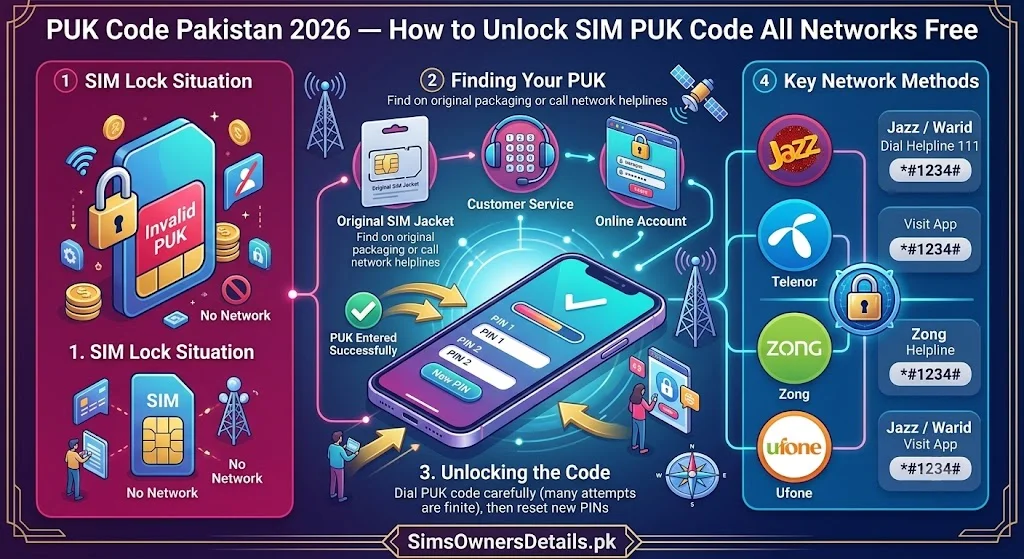
A locked SIM is one of the most frustrating mobile emergencies a Pakistani user can face. You enter your SIM PIN incorrectly three times, your phone displays “SIM locked — Enter PUK code,” and suddenly you are cut off from calls, messages, internet, JazzCash, Easypaisa, and every service linked to your number.
The PUK (Personal Unblocking Key) code is the only way to unlock a PIN-locked SIM. Every SIM has one — it is an 8-digit code assigned by your operator at the time of SIM manufacture. And the good news: obtaining your PUK code in Pakistan is completely free, takes less than 5 minutes through most methods, and is available 24/7 through multiple official channels.
This guide covers every method to get your PUK code in Pakistan for all five networks — Jazz, Zong, Telenor, Ufone, and SCO — plus critical warnings about what NOT to do when your SIM is locked.
Most Important Warning: A SIM has only 10 PUK entry attempts. If you enter the wrong PUK code 10 times, your SIM is permanently destroyed and cannot be recovered. Always get your correct PUK code before attempting entry.
What Is a PUK Code and Why Do You Need It?
A PUK (Personal Unblocking Key) code — also called PUK1 in technical documentation — is an 8-digit security code that unlocks a SIM card after it has been locked due to too many incorrect PIN entries.
How SIM locking works:
- Your SIM has an optional PIN protection feature (4–8 digits)
- If you enter the wrong PIN 3 consecutive times, your SIM automatically locks
- The locked SIM cannot be used until the correct PUK code is entered
- After entering the correct PUK code, you set a new SIM PIN and normal service resumes
Why PUK matters:
- You cannot bypass PUK — it is a hardware-level security feature built into every SIM
- Only your operator knows your PUK code — it cannot be found by searching online
- Getting the wrong PUK from an unofficial source and entering it wrong 10 times destroys your SIM permanently
PUK2 vs PUK1: Most phones prompt for PUK1 (also just called PUK) when the regular SIM PIN is locked. PUK2 is a separate code used only to unlock a locked PIN2 (which controls premium services on some SIMs). For most users, PUK1 is what you need.
What Happens When Your SIM Is PUK Locked — Step by Step
Understanding the exact sequence prevents panic and mistakes:
Stage 1 — PIN locked (wrong PIN × 3): Your phone displays: “SIM locked. Enter PUK code.” or “Enter SIM network unlock PIN.”
At this stage:
- Your SIM still exists and is perfectly functional — it is just locked
- You have 10 PUK entry attempts remaining before permanent damage
- Do NOT guess at the PUK code — every wrong entry uses one of your 10 attempts
- Do NOT power off and on your phone repeatedly hoping it resets — it does not
Stage 2 — PUK entry (after getting correct code): Enter the 8-digit PUK code your operator provides. Your phone then prompts you to create a new SIM PIN (4–8 digits of your choice). After setting the new PIN, your SIM unlocks immediately and normal service resumes.
Stage 3 — If PUK entered wrong 10 times (permanent failure): Your SIM is permanently destroyed — it cannot be unlocked by any means. You must visit your operator’s franchise for a SIM replacement (same number, new physical SIM card). Biometric verification is required for replacement.
How to Get Jazz PUK Code Pakistan — All Methods
Method 1: Jazz PUK via SIM Card Packaging (Fastest If Available)
When you first received your Jazz SIM, it came on a SIM card holder — a piece of cardboard the SIM was punched out of. The PUK code is printed on this packaging.
Where to look:
- On the back of the SIM card tray (the cardboard holder)
- Under a silver scratch-off strip
- Printed below or beside the SIM card slot
If you kept your original packaging: this is your fastest method and does not require any call or wait.
Method 2: Jazz PUK via Jazz World App
- Open Jazz World app on any internet-connected device
- Log in with your Jazz number
- Navigate to My Account → SIM Details → PUK Code
- Your PUK code displays on screen
Note: This method only works if you can log into Jazz World — which requires access to your Jazz number for OTP. If your SIM is the locked one, you need internet access and the OTP sent to a different device or via email if you have set up email backup.
Method 3: Jazz PUK via Jazz Helpline (111)
- Call 111 from any Jazz SIM (not the locked one) or any other phone
- Tell the representative: “My Jazz SIM PIN is locked and I need my PUK code.”
- Provide identity verification:
- Your Jazz number (the locked one)
- Your CNIC number
- Your registered name
- The representative provides your PUK code verbally
- Write it down before ending the call
Helpline availability: 24/7 Cost: Free from Jazz; standard call rate from other phones
Method 4: Jazz PUK via SMS (Limited)
Some Jazz SIM types support a PUK code request via SMS to a service number. Check Jazz’s current SMS service list by calling 111 — this method varies by SIM type and region.
How to Get Zong PUK Code Pakistan — All Methods
Method 1: Zong PUK via SIM Packaging
Check the original SIM card packaging — the Zong PUK code is printed on the back of the SIM card tray under a scratch-off strip.
Method 2: Zong PUK via My Zong App
- Open My Zong app
- Log in with your Zong number
- Navigate to My Account → Account Information → PUK Code
- View your PUK code
Method 3: Zong PUK via Helpline (310)
- Call 310 from any Zong SIM or 021-310 from any phone
- Request PUK code for your locked Zong SIM
- Provide: your Zong number, CNIC number, registered name
- Receive PUK code verbally
Helpline availability: 24/7 Cost: Free from Zong
Method 4: Zong PUK via Franchise
- Visit any Zong Service Centre with your original CNIC
- Request PUK code for your locked SIM
- Complete biometric identity verification
- Receive your PUK code on a printed slip
How to Get Telenor PUK Code Pakistan — All Methods
Method 1: Telenor PUK via SIM Packaging
Check the Telenor SIM card’s original packaging — PUK code is printed on the reverse of the SIM card holder, often under a silver scratch-off section.
Method 2: Telenor PUK via My Telenor App
- Open My Telenor app
- Log in with your Telenor number
- Go to My Profile → SIM Details → PUK Code
- Your PUK code is displayed
Method 3: Telenor PUK via Helpline (345)
- Call 345 from any Telenor SIM or 021-345 from any phone
- Request PUK code for your locked Telenor SIM
- Provide identity verification: Telenor number, CNIC, registered name
- Receive PUK code verbally
Helpline availability: 24/7 Cost: Free from Telenor
Method 4: Telenor PUK via USSD (Limited)
Telenor may offer a USSD path to retrieve PUK code on some SIM types. Dial *345# and navigate to SIM Services — if PUK retrieval is available for your SIM type, it will appear as an option.
How to Get Ufone PUK Code Pakistan — All Methods
Method 1: Ufone PUK via SIM Packaging
The Ufone PUK code is printed on the back of the original SIM card holder — check the scratch-off section on the cardboard packaging.
Method 2: Ufone PUK via U-App
- Open U-App (Ufone’s official app)
- Log in with your Ufone number
- Navigate to My Account → SIM Details
- PUK code is displayed in the SIM information section
Method 3: Ufone PUK via Helpline (333)
- Call 333 from any Ufone SIM or 021-333 from any phone
- Request PUK code for your locked Ufone SIM
- Provide: Ufone number, CNIC number, registered name
- Receive PUK code verbally
Helpline availability: 24/7 Cost: Free from Ufone
Method 4: Ufone PUK via Franchise
- Visit any Ufone Customer Service Centre
- Bring original CNIC
- Request PUK code with biometric verification
- Receive printed PUK code confirmation
How to Get SCO PUK Code — AJK and GB
Method 1: SCO PUK via SIM Packaging
Check the original SCO SIM card tray — PUK code is printed on the packaging.
Method 2: SCO PUK via Helpline (1236)
- Call 1236 from any SCO SIM or a regular phone
- Request PUK code for your locked SCO SIM
- Provide identity verification
- Receive PUK code verbally
Method 3: SCO Franchise
Visit any SCO Customer Service Centre in AJK or GB with your original CNIC.
How to Enter the PUK Code — Step by Step
Once you have your correct PUK code, follow this exact process:
On Android Phones:
Step 1: When your phone displays the PUK entry screen, tap on the PIN entry field.
Step 2: Enter the 8-digit PUK code exactly as provided by your operator.
Step 3: Press OK or Confirm.
Step 4: If the PUK is correct, your phone immediately prompts you to create a new SIM PIN.
Step 5: Enter a new 4–8 digit SIM PIN of your choice.
Step 6: Re-enter the new PIN to confirm.
Step 7: Your SIM unlocks and normal service resumes within seconds.
On iPhones:
Step 1: On the PUK entry screen that appears when you turn on your phone, enter your 8-digit PUK code.
Step 2: Tap Unlock.
Step 3: Create a new SIM PIN when prompted.
Step 4: Confirm the new PIN.
Step 5: Your iPhone reconnects to the network.
If the PUK Is Not Accepted:
- Carefully re-read the PUK code you received — ensure there is no confusion between 0 (zero) and O (letter O), or 1 and I
- Count the digits — must be exactly 8
- Try again — but remember, each wrong attempt uses one of your 10 total
Critical Warnings — What Not to Do When Your SIM Is PUK Locked
Warning 1: Do NOT search for PUK codes online No website can tell you your specific SIM’s PUK code — it is unique to your SIM and stored only by your operator. Any website claiming to generate or look up PUK codes is a scam that may steal your personal information.
Warning 2: Do NOT enter random 8-digit numbers Each incorrect PUK entry counts toward your 10-attempt limit. 10 wrong attempts = permanently destroyed SIM. Never guess.
Warning 3: Do NOT believe anyone offering to “unlock” your SIM for a fee No third-party service can unlock a PUK-locked SIM — only your operator can provide the correct PUK code, and they provide it free.
Warning 4: Do NOT repeatedly power cycle your phone Turning your phone off and on does not reset the PUK lock or the attempt counter. The lock persists regardless of power cycles.
Warning 5: Do NOT try another SIM’s PUK code Every SIM has a unique PUK code. Using a PUK code from a different SIM will fail and consume an attempt.
How to Prevent SIM PIN Locking in the Future
Most Pakistanis do not set a SIM PIN — the PIN protection is optional. If you are concerned about accidentally locking your SIM again:
Option 1: Disable SIM PIN (Simplest) On Android: Settings → Security → SIM Card Lock → Disable SIM Lock On iPhone: Settings → Cellular → SIM PIN → toggle off
This removes PIN protection entirely — your SIM will not lock even if someone else accesses your phone, but you also eliminate the risk of accidental PIN locking.
Option 2: Write Down Your SIM PIN If you use PIN protection for security, write your PIN in a secure, accessible location so you never need to guess it.
Option 3: Write Down Your PUK Code Now When you have your PUK code (from your SIM packaging or operator), write it down and keep it separate from your phone. This ensures you have it available if needed.
Frequently Asked Questions — PUK Code Pakistan
Q: My SIM is PUK locked and I do not have access to my Jazz number for the helpline’s OTP. What should I do?
A: Call Jazz 111 from a different phone (a family member’s phone is fine). Explain the situation — the representative can verify your identity via CNIC and provide the PUK code without requiring an OTP to the locked SIM.
Q: Can I get a PUK code without visiting a franchise?
A: Yes. All five operators provide PUK codes via their helplines (111/310/345/333/1236) over the phone after CNIC-based identity verification. Franchise visit is not required.
Q: What happens to my SIM data, contacts, and balance if I use the PUK code?
A: Nothing is lost. PUK unlocking only changes your SIM PIN — it does not affect your balance, stored contacts, registered number, CNIC linkage, or any other data.
Q: I entered the PUK code 10 times incorrectly. What are my options?
A: Your SIM is permanently destroyed. Visit your operator’s franchise with your original CNIC to request a replacement SIM for the same number. Biometric verification confirms you are the registered owner and a new SIM is issued with your existing number.
Q: Is the PUK code the same as the SIM card number (ICCID)?
A: No. The ICCID is the SIM card’s serial number (19–20 digits), printed on the SIM card itself. The PUK code is a separate 8-digit security code. They are different.
Q: How long does it take to unlock a SIM using the PUK code?
A: If you have the correct PUK code, unlocking takes under 60 seconds — enter the 8 digits, set a new PIN, done. The delay is only in obtaining the PUK code if you do not have it ready.
Q: My SIM PIN was entered wrong 3 times by my child/someone else. Do I lose anything?
A: No SIM data or services are lost. You simply need to obtain the PUK code and unlock the SIM. The PIN lock is a security feature, not a data loss event.
All-Network PUK Code Reference — Quick Summary
| Network | Helpline | App Method | Packaging |
|---|---|---|---|
| Jazz | 111 (free) | Jazz World app | SIM tray back |
| Zong | 310 (free) | My Zong app | SIM tray back |
| Telenor | 345 (free) | My Telenor app | SIM tray back |
| Ufone | 333 (free) | U-App | SIM tray back |
| SCO | 1236 | N/A | SIM tray back |
When your SIM is PUK locked, stay calm. Do not guess. Call your operator’s helpline — they will give you the correct PUK code in under 5 minutes, completely free.
For Pakistan’s most comprehensive SIM registration and verification resource, visit Sim Owner Details — and for details on how your SIM’s registration status is affected by any SIM management action, see our SIM database guide.
Related Guide:
- PTA Helpline 0800-55055 — What to Report and How to File Complaint Pakistan 2026
- SIM Information Check by Mobile Number Pakistan 2026 — Free Official Guide
- 668 CNIC Check Advanced Uses 2026 — 12 Hidden Features Most Pakistanis Don’t Know
- Check Number Details Pakistan 2026 — Find Mobile Number Owner Free Official Methods
- eSIM Pakistan Setup Guide 2026 — How to Activate eSIM on Any Network
 SIM OWNER DETAILS