
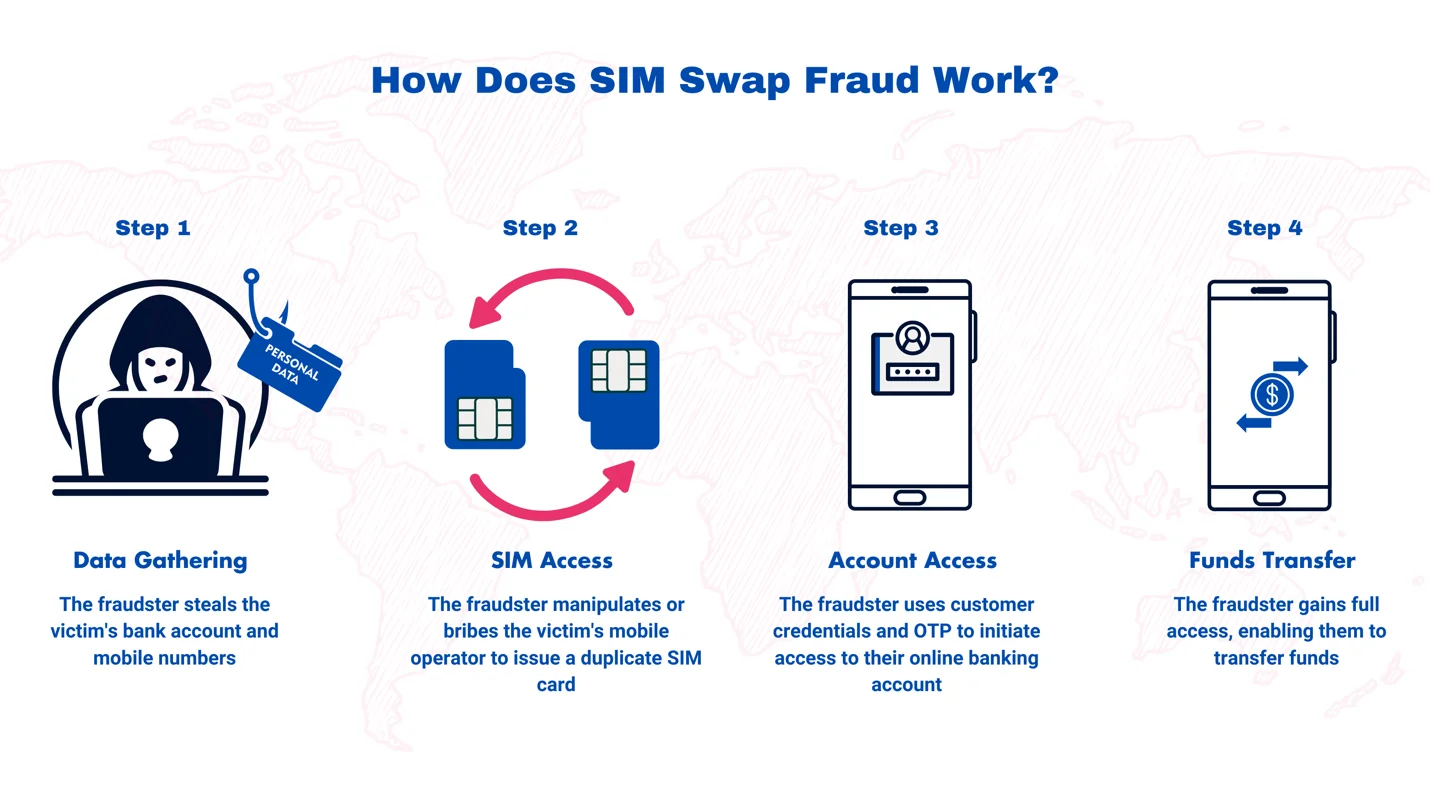
SIM swap fraud is Pakistan’s fastest-growing cybercrime in 2026 — and most victims do not even realize they have been attacked until their bank account, JazzCash wallet, or Easypaisa account is completely drained.
Unlike traditional theft, SIM swap fraud requires no physical break-in. The criminal never touches your phone. Instead, they clone your mobile number by convincing your operator to transfer your number to a new SIM — one that they control. From that moment, every OTP, every bank verification code, every WhatsApp message meant for you goes to them instead.
This guide explains exactly how SIM swap fraud works in Pakistan, the warning signs that an attack is underway, and the precise steps you must take to prevent it — or recover from it if it has already happened.
Critical Warning Sign: If your phone suddenly shows “No Service” or “SIM Not Registered” without any physical reason, check your accounts immediately. Your SIM may have already been swapped.
What Is SIM Swap Fraud?
SIM swap fraud — also called SIM hijacking or SIM jacking — is a form of identity theft where a criminal convinces your mobile network operator to deactivate your real SIM and transfer your phone number to a new SIM card that the criminal owns.
Once the swap is complete:
- Your phone loses all signal and cannot make calls or send texts
- The criminal’s phone now receives all calls, SMS messages, and OTPs sent to your number
- They use this access to request password resets for your bank, JazzCash, Easypaisa, WhatsApp, email, and social accounts
- Your accounts are compromised within minutes
In Pakistan, SIM swap fraud has been specifically linked to:
- JazzCash and Easypaisa account draining — mobile wallets are primary targets
- Online banking takeovers — HBL, UBL, Meezan, MCB, and other banks all use SMS OTP
- WhatsApp account hijacking — used to scam victims’ contacts
- Cryptocurrency wallet theft — if 2FA is via SMS
The Pakistan Telecommunication Authority (PTA) and the Federal Investigation Agency (FIA) Cybercrime Wing have both flagged SIM swap fraud as a priority threat to Pakistani consumers.
For an overview of all SIM-related fraud types and verification tools available in Pakistan, visit simsownersdetails.pk — Pakistan’s dedicated platform for SIM security and verification.
How SIM Swap Fraud Works — Step by Step
Understanding the exact process criminals use is the most powerful form of prevention. Here is the complete SIM swap fraud playbook used in Pakistan:
Phase 1: Reconnaissance (Information Gathering)
Before attempting the swap, the criminal needs specific information about you:
- Your full name (linked to your CNIC)
- Your CNIC number (partial or full)
- Your current mobile number
- Your network operator (Jazz, Zong, Telenor, or Ufone)
- Ideally: your account security answer or last recharge amount
How they gather this information:
- Purchasing data from black market databases (unfortunately common in Pakistan)
- Social engineering — calling you posing as your bank or PTA
- Phishing — fake websites or SMS links that steal your login credentials
- Physical theft — stealing your wallet or reading your CNIC at a shop
- Data from corrupt insiders at banks, telcos, or franchise employees
Phase 2: The SIM Swap Request
Armed with your information, the criminal approaches your operator — either in person at a franchise or via the operator’s customer care line:
At the franchise method:
- The criminal presents a fake CNIC (printed with your details, their photo)
- They claim their SIM is lost or damaged
- They request a replacement SIM on your number
- A corrupt or careless employee processes the request
- Biometric verification should stop this — but some franchises have workarounds
Via customer care method:
- The criminal calls the operator helpline
- They pretend to be you
- They provide your name, CNIC, and answer security questions
- If the agent is convinced, they process the SIM replacement remotely
- This method relies on social engineering of the customer care agent
Phase 3: The Attack Window
The moment the swap is processed:
- Your real SIM becomes inactive (you lose signal)
- The criminal’s SIM is now “you”
- They immediately begin requesting password resets and OTPs for every account linked to your number
- This phase happens fast — criminals typically drain accounts within 15–30 minutes of a successful swap
Phase 4: Cover and Escape
- Transactions are moved through multiple mobile wallets to make tracing difficult
- Accounts may be used for further scams before being abandoned
- The criminal often deactivates the swapped SIM within hours to reduce traceability
Real SIM Swap Fraud Cases in Pakistan
Case 1 — JazzCash Draining (Lahore, 2025) A trader received a call from someone claiming to be a Jazz representative offering a “loyalty upgrade.” The caller asked him to confirm his CNIC last 4 digits and his recent recharge amount. Within two hours of that call, his JazzCash wallet lost Rs. 85,000. Investigation revealed a SIM swap had occurred using the information he provided.
Case 2 — Bank Account Takeover (Karachi, 2025) A businesswoman’s phone showed “No Service” during lunch. She assumed it was a network issue. When service returned two hours later, she found Rs. 2.3 lakh had been transferred from her HBL account via internet banking — every transaction verified by OTP sent to the swapped SIM.
Case 3 — WhatsApp Scam Chain (Multiple Cities, 2024) A WhatsApp SIM swap resulted in the criminal impersonating a doctor to all his contacts, requesting urgent money transfers. 11 contacts transferred a total of Rs. 180,000 before the fraud was discovered.
Warning Signs of SIM Swap Fraud in Progress
Catching a SIM swap attempt early can prevent financial loss. These are the signs:
Immediate red flags:
- Your phone suddenly shows “No Service” or “No Network” — without any physical damage or travel to a remote area. This is the most critical warning sign.
- You receive calls or messages about account activity you did not initiate — especially password reset requests or OTP messages you did not request.
- You cannot make calls or send SMS despite having balance and being in a coverage area.
- Your operator’s app shows a different SIM or ICCID number than usual.
- You receive a notification that your SIM has been “replaced” or “updated.”
- Your contacts report receiving suspicious messages or calls from your number asking for money or personal information.
If you notice any of these signs:
- Immediately call your bank from a different phone to freeze your account
- Call your operator’s emergency helpline from a different phone
- Check your JazzCash, Easypaisa, and all financial apps for unauthorized transactions
How to Prevent SIM Swap Fraud in Pakistan — 10 Proven Methods
Method 1: Add a SIM Lock / PIN to Your Account
Call your operator’s helpline and request a SIM lock or account PIN. This means any changes to your SIM — including a swap request — require a PIN you set. Without it, no swap can be processed.
- Jazz: Call 111
- Zong: Call 310
- Telenor: Call 345
- Ufone: Call 333
Method 2: Reduce SMS OTP Dependency
Where possible, switch from SMS-based OTP to authenticator apps like Google Authenticator or Microsoft Authenticator. These generate codes on your physical device — a SIM swap cannot intercept them.
Method 3: Use Strong, Unique Passwords for Financial Apps
If an attacker cannot trigger a password reset (because your password is unknown and unique), a SIM swap provides less value. Use a password manager.
Method 4: Monitor Your SIMs via 668 Monthly
Regular 668 checks reveal unauthorized SIM registrations before they can be used for fraud. Our complete Pakistan SIM database monitoring guide explains how to set up a monitoring routine.
Method 5: Never Share CNIC or Personal Details Over Phone
Your operator, bank, NADRA, and PTA will never call you asking for your CNIC number, PIN, or password. Any call requesting this information is either fraud or social engineering.
Method 6: Enable Bank Account Alerts
Every Pakistani bank allows you to set transaction alerts via email and push notification — not just SMS. Enable email alerts so that even if your SIM is swapped, you receive notification via email.
Method 7: Register an Alternate Number With Your Bank
Banks allow you to register a secondary contact number. Ensure this is a number not associated with your CNIC — ideally a family member’s number on a different CNIC. This gives you a backup notification channel.
Method 8: Keep Your CNIC Secure
Never leave your wallet unattended. Protect your CNIC photocopy by writing its specific purpose and date on every copy. CNIC information is the foundation of a SIM swap attack.
Method 9: Report Suspicious Calls Immediately
If you receive a call that seemed like social engineering — even if you gave no information — call your operator immediately and alert them. They can flag your account for heightened scrutiny.
Method 10: Check Your SIM Info Regularly
Use official tools to monitor your SIM details. Pakistan’s dedicated SIM monitoring portal at simsownersdetails.pk/sim-info/ provides guidance on tracking your SIM status and identifying anomalies.
What to Do If You Have Already Been SIM Swapped — Emergency Protocol
Act within the first 30 minutes. Every minute of delay increases financial losses.
Minute 0–5: Confirm the swap
- Try to make a call from your phone — if it fails with “No Service,” assume a swap
- Call your operator from a different phone to confirm
Minute 5–15: Freeze your money
- Call your bank’s 24/7 fraud line from a different phone — freeze all transactions
- JazzCash fraud: Call 111 (Jazz)
- Easypaisa fraud: Call 345 (Telenor)
- Request immediate account suspension until the SIM issue is resolved
Minute 15–30: Restore your SIM
- Visit your operator’s nearest franchise immediately with your original CNIC
- Request emergency SIM restoration — operators have a fraud protocol for this
- Your CNIC biometric is the proof of ownership
Within 24 Hours:
- File an FIR at your local police station — get the FIR number
- File a complaint with FIA Cybercrime at complaint.fia.gov.pk
- File a complaint with PTA at complaint.pta.gov.pk or call 0800-55055
- Contact your bank’s fraud department with the FIR number to begin dispute resolution
Within 72 Hours:
- Change passwords for every account linked to your swapped number
- Enable authenticator app 2FA wherever possible
- Inform your contacts that your number was compromised — prevent secondary scams
How PTA and FIA Are Fighting SIM Swap Fraud in Pakistan
Pakistan’s regulatory agencies have strengthened SIM swap protections in recent years:
PTA measures:
- Biometric verification is now mandatory for all SIM-related changes including replacements
- Operators must send a notification to the registered email (if available) when any SIM change is processed
- PTA’s 0800-55055 helpline handles SIM fraud complaints with priority
FIA Cybercrime Wing:
- Maintains a dedicated digital fraud investigation team
- Coordinates with operators to trace fraudulent SIM swap transactions
- Prosecutes convicted SIM swap fraudsters under PECA 2016 — penalties include up to 7 years imprisonment
Operator-level protections:
- All four major operators have implemented SIM swap delay periods — a waiting period between the request and activation
- Some operators offer voluntary SIM lock services as described above
Frequently Asked Questions — SIM Swap Fraud Pakistan
Q: How do I know if my SIM has been swapped? A: The clearest sign is your phone showing “No Service” or “SIM Not Registered” unexpectedly. Also watch for receiving unexpected OTP messages or not receiving calls you expect.
Q: Can SIM swap fraud happen to any Pakistani mobile user? A: Yes. Any Pakistani with a mobile number linked to financial accounts is a potential target. Higher-value targets (business owners, individuals with large mobile wallet balances) face greater risk.
Q: How long does it take to restore a swapped SIM? A: With your original CNIC and biometric verification at a franchise, the restoration typically takes 30–60 minutes during business hours. The operator has a fraud restoration protocol.
Q: Will my bank refund money lost to SIM swap fraud? A: This depends on the bank and the circumstances. If you report promptly and file an FIR, banks are more likely to initiate dispute resolution. Some Pakistani banks have policies covering SIM swap losses — check with your bank directly.
Q: Is it safe to use SMS OTP for banking in Pakistan? A: SMS OTP is the industry standard in Pakistan and generally safe — but SIM swap fraud exploits it. Supplement it with strong passwords, email alerts, and authenticator apps where possible.
Q: Can a SIM swap happen without my knowledge at a franchise? A: It requires biometric verification, which significantly raises the bar. However, cases involving fake fingerprint moulds or corrupt franchise employees have been documented. Regular 668 checks are your primary defence.
Q: What is the punishment for SIM swap fraud in Pakistan? A: Under PECA 2016 (Prevention of Electronic Crimes Act), SIM swap fraud carries penalties of up to 7 years imprisonment and fines up to Rs. 10 million depending on the specific offences committed.
Q: How can I protect my JazzCash specifically from SIM swap? A: Set a strong JazzCash PIN, enable transaction limit controls within the app, and register email notifications. Contact Jazz at 111 to request a SIM lock on your account.
Summary — Protecting Yourself from SIM Swap Fraud in Pakistan
SIM swap fraud is a real, growing, and devastating threat to Pakistani mobile users in 2026. But it is also entirely preventable with the right habits and tools.
Your SIM swap protection checklist:
- ✅ Add a SIM lock PIN to your operator account (call 111/310/345/333)
- ✅ Enable email alerts on all bank accounts — not SMS only
- ✅ Check your CNIC SIMs via 668 every month
- ✅ Never share CNIC or personal details over phone with unknown callers
- ✅ Switch to authenticator app 2FA wherever possible
- ✅ Know the emergency numbers: Bank fraud line, operator helpline, PTA 0800-55055, FIA Cybercrime
If you suspect your SIM has been swapped right now — call your bank from a different phone immediately. Every second counts.
For a complete toolkit of SIM monitoring and protection resources, visit Sim Owner Details — and explore the SIM information guide to understand every dimension of your mobile security in Pakistan.
Related Guides
 SIM OWNER DETAILS
2 thoughts on “SIM Swap Fraud Pakistan 2026 — How to Detect, Prevent and Recover”