
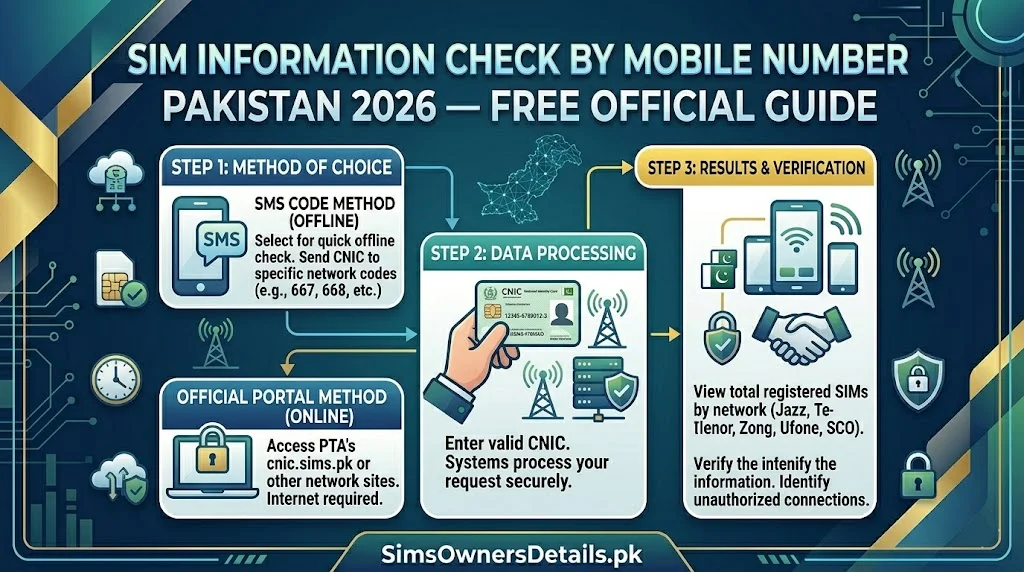
One of the most frequently searched questions in Pakistan’s mobile ecosystem is: “How can I check SIM information by mobile number?” Pakistani citizens want to know who owns a specific number calling them, whether a number is registered or unregistered, which network a number belongs to, and what SIM details are associated with a given mobile number.
The answers to these questions exist — but they are more nuanced than most people expect. Pakistani law under PECA 2016, PTA’s consumer protection regulations, and NADRA’s data privacy framework create a clear legal boundary between what SIM information is publicly accessible and what is legally protected private data. Understanding this boundary is not just legally important — it is practically essential for getting the information you actually need through the right channels.
This guide explains exactly what SIM information you can check by mobile number in Pakistan through official channels, what information is legally protected and why, and how to use the right tool for each specific information need.
Critical Distinction: You can legally check SIM information for numbers registered on your own CNIC via official free tools. Checking SIM owner details for another person’s number through public channels is illegal under PECA 2016.
What “SIM Information by Mobile Number” Can Legally Mean in Pakistan
When Pakistanis search for “SIM information check by mobile number,” they are typically looking for one of four distinct types of information — each with a different legal status:
Type 1: Which Network Does This Number Belong To? (Legal — Free)
Identifying whether a number is Jazz, Zong, Telenor, Ufone, or SCO based on its prefix is completely legal and publicly available. This is a basic telecom routing fact — not personal information.
Method: Simply look at the number’s prefix:
- 030x (0300–0305) = Jazz
- 031x (0310–0319) = Zong
- 034x (0340–0349) = Telenor
- 033x (0331–0336) = Ufone
- 032x (0320–0321) = SCO
Limitation: Ported numbers (moved via MNP 667) may carry a prefix from their original network but now operate on a different network. The operator may be different from what the prefix suggests for ported numbers.
Type 2: Is This Number Registered or Unregistered? (Legal for Your Own CNIC)
You can check whether a specific number is registered on your CNIC via 668 or cnic.sims.pk. If the number appears in your CNIC’s 668 results, it is registered on your CNIC. If it does not appear, it is not registered on your CNIC (though it may be registered on someone else’s CNIC).
You cannot check whether a specific number is registered at all without knowing whose CNIC it is registered under.
Type 3: Who Is the Registered Owner of This Number? (Restricted — Law Enforcement Only)
This is the most commonly sought but most legally restricted category. The registered owner’s name, CNIC, and personal details for any specific mobile number are private information protected under PECA 2016 and not accessible through public channels.
Only law enforcement authorities — police, FIA, intelligence agencies — can compel operators to reveal this information under legal authority (court order or investigative mandate).
Type 4: Which SIMs Are Registered on My Own CNIC? (Legal — Free)
This is the core function of the 668 service and cnic.sims.pk — checking which numbers are registered on YOUR CNIC. This is the legal, official, and recommended approach.
What You Can Check About Any Mobile Number — Legal Methods
Check 1: Network Identification (Completely Public)
Purpose: Identify which mobile network a number belongs to.
Method: Use the prefix guide below or network identification tools:
| Prefix Range | Network |
|---|---|
| 0300–0309 | Jazz |
| 0320–0321 | SCO |
| 0310–0319 | Zong |
| 0330–0339 | (Various — check with operator) |
| 0331–0336 | Ufone |
| 0340–0349 | Telenor |
Free tool: Simply look at the first 4 digits of the mobile number.
Check 2: Whether a Number Is Active (Via Calling or SMS)
Purpose: Confirm whether a number is active on the network.
Method: Call or send an SMS to the number. If the call connects or the SMS delivers, the number is active. If you hear “number not in service” or messages fail to deliver, the number is inactive or deactivated.
Limitation: This tells you the number is active — not who owns it or whether it is legitimately registered.
Check 3: Whether Your Own SIM Is Correctly Registered (Via 668 or Franchise)
Purpose: Verify your own SIM’s registration status, CNIC linkage, and BVS status.
Method: Use 668, cnic.sims.pk, operator USSD codes, or franchise visit as detailed throughout this guide.
What this tells you: Whether a specific number you own is correctly registered under your CNIC with completed biometric verification.
Check 4: File a Complaint to Identify a Harassing Number (Via PTA or FIA)
Purpose: If you are receiving threatening, harassing, or fraudulent calls from an unknown number, the legal path to identifying the owner is through official complaint channels — not through public lookup.
Method:
- File a complaint with PTA at complaint.pta.gov.pk or call 0800-55055
- For criminal threats: file an FIR and engage FIA Cybercrime at complaint.fia.gov.pk
- PTA and FIA have authority to compel operators to reveal registered owner details as part of a legal investigation
- The information is shared with law enforcement — not directly with you as the complainant
For comprehensive SIM information tools and Pakistan’s official SIM verification infrastructure, visit our SIM information guide.
How to Check Your Own SIM Information by Mobile Number
This is the legitimate, legal use case — and it has multiple powerful official tools:
Method 1: Check Via Your Operator’s USSD Code
For your own number on your own SIM, USSD codes provide instant SIM information:
| Network | SIM Info Code | Function |
|---|---|---|
| Jazz | *551# → Account Info | Registration details, CNIC, BVS status |
| Zong | *310# → My Account | Registration details, account info |
| Telenor | *345# → My Account | SIM registration details |
| Ufone | *336# → Account Info | SIM and registration details |
| SCO | *310# | Basic account info |
These codes show your own SIM’s registered CNIC (partially masked), registration status, and BVS verification status.
Method 2: Check Via 668 (Cross-Network CNIC View)
To see all SIMs registered on your CNIC — not just the one in your phone:
- Send your CNIC to 668
- Receive a list of all numbers associated with your CNIC
- Confirm every number in the list is yours
Method 3: Check Via cnic.sims.pk (Web Portal)
Same as 668 but via browser — preferred when internet is available and documentation is needed.
Method 4: Check Via Operator Franchise (Most Complete)
For the most complete SIM information by mobile number for your own account:
- Visit your operator’s franchise with original CNIC
- The biometric terminal shows: registration date, franchise location, full CNIC, BVS status, account history
- This is the only method that provides registration location data
Why You Cannot Legally Check Another Person’s SIM Owner by Number in Pakistan
This deserves a thorough explanation because many Pakistanis believe this information should be freely available — and understanding why it is not helps avoid both legal risk and wasted effort on illegal services.
PECA 2016 Section 14 — The Legal Basis:
Section 14 of PECA 2016 prohibits unauthorized access to another person’s identity information. A Pakistani mobile user’s name, CNIC number, address, and biometric data linked to their SIM registration are all classified as identity information. Accessing this without legal authority is a criminal offence carrying up to 3 years imprisonment.
Why This Protection Exists:
Privacy right: Citizens have a fundamental right to control their personal identity information. Allowing anyone to look up who owns any mobile number would enable stalking, harassment, targeted fraud, and discrimination.
Fraud prevention paradox: Ironically, freely searchable SIM owner databases would make SIM fraud easier, not harder — criminals could verify whether a given CNIC is linked to a high-value number before targeting it.
International standard: Pakistan’s approach aligns with international telecom privacy standards — virtually no country allows public lookup of mobile number owner details.
The Illegal “SIM Data” Market — What to Avoid:
Numerous websites and Telegram channels claim to provide SIM owner details — names, CNICs, addresses — for any Pakistani mobile number, for a fee. These services are:
- Illegal under PECA 2016 — both to operate and to use
- Frequently fraudulent — they often provide fake, outdated, or fabricated data
- Dangerous to you — purchasing from them exposes you to criminal prosecution and often data theft
- Actively targeted by PTA and FIA — operators of these services have been arrested and prosecuted
The legitimate alternative: if you have a genuine legal need to identify a number’s owner (harassment, fraud, criminal investigation), file a complaint with PTA or FIA. They have the legal authority to compel this information from operators.
What Information Operators CAN Confirm About a Number
While operators cannot share another subscriber’s personal details with you, they can confirm or provide certain information:
Information Operators Will Confirm:
- Whether a specific number is active on their network (yes/no)
- Whether a port request is pending for your number
- Whether suspicious activity has been flagged on your account
- Registration details for your own account with identity verification
Information Operators Cannot Share With You:
- The registered name of another subscriber
- The CNIC linked to another number
- The address of another subscriber
- Any personal details of other subscribers
Why this matters: Even if you call Jazz 111 with a specific number and ask “who is this registered to?” — Jazz will not tell you. This is not incompetence — it is legal compliance with PECA 2016 and PTA data protection regulations.
Checking SIM Network Information — The Complete Number Prefix Reference
For the specific task of identifying which network a Pakistani mobile number belongs to — which IS publicly available information — here is the complete 2026 reference:
Jazz Number Prefixes:
0300, 0301, 0302, 0303, 0304, 0305, 0306, 0307, 0308, 0309
Zong Number Prefixes:
0310, 0311, 0312, 0313, 0314, 0315, 0316, 0317, 0318, 0319
Telenor Number Prefixes:
0340, 0341, 0342, 0343, 0344, 0345, 0346, 0347, 0348, 0349
Ufone Number Prefixes:
0330, 0331, 0332, 0333, 0334, 0335, 0336, 0337, 0338, 0339
SCO Number Prefixes (AJK and GB):
0320, 0321
Important Note on Ported Numbers:
When a number is ported via MNP (667 service), it keeps its original prefix but moves to a new network. This means a number starting with 0312 (originally Zong) could now be on Telenor or Jazz if it has been ported.
To confirm the current network for a ported number: The 668 reply shows the current network operator (not the original prefix network) — use this for accurate current network identification.
For Pakistan’s complete SIM registration database reference including how all network registrations and ports are recorded, visit our Pakistan SIM database guide.
When You Receive an Unknown Call — The Legal and Effective Approach
When you receive calls from an unknown Pakistani number and want information about it:
Step 1: Identify the Network (Immediate — Free)
Check the number’s prefix against the table above to identify the operator.
Step 2: Block the Number (Immediate — Free)
On any smartphone: open the call log → tap the number → select “Block” or “Block & Report.” This prevents future calls from that number.
Step 3: Report to PTA (For Harassing Calls — Free)
File a complaint at complaint.pta.gov.pk with the number, dates/times of calls, and a description of the issue. PTA can investigate the registration and take action against fraudulent numbers.
Step 4: Report to FIA (For Threatening or Criminal Calls — Free)
For calls involving threats, extortion, fraud attempts, or other criminal content, file at complaint.fia.gov.pk or call FIA Cybercrime at 9911.
Step 5: File an FIR (For Serious Cases — Free)
Visit your local police station to file a First Information Report (FIR) with the harassing number included as evidence. This creates a legal record and enables police investigation.
Frequently Asked Questions — SIM Information Check by Mobile Number Pakistan
Q: Can I find out who is calling me from an unknown Pakistani number?
A: Not through public channels. Network identification (is it Jazz, Zong, etc.) is available via the number prefix. The registered owner’s identity requires a PTA or police complaint and investigation.
Q: Is there any legal free service to check SIM owner details for any number?
A: No. No free or paid legal public service provides SIM owner details for arbitrary Pakistani mobile numbers. Services claiming to do so are illegal and often fraudulent.
Q: What if I want to verify that a business number I’m about to transact with is legitimate?
A: Call the number and ask the business for their official information. Request their registered business name and NTN. Verify independently through government business registries. There is no SIM lookup service for this purpose.
Q: Can police check who owns a specific mobile number?
A: Yes. Police, FIA, and intelligence agencies can legally compel operators to reveal subscriber information with appropriate authority (FIR, court order, investigative mandate under PECA 2016).
Q: I own multiple SIMs. How do I check the information for each one?
A: Use 668 to see all SIMs on your CNIC simultaneously. For individual SIM details, use the operator-specific USSD code (*551# for Jazz, *310# for Zong, *345# for Telenor, *336# for Ufone) from each SIM.
Q: Does SIM information change after porting (MNP)?
A: The number stays the same. The network operator changes to the recipient network. The CNIC registration remains with the same owner. The prefix may not match the new network. 668 always shows the current network, not the original one.
Q: How can I find out if my number has been ported without my knowledge?
A: Check 668 — if a number that was on one network now shows on a different network, it has been ported. If you did not authorize the port, contact PTA at 0800-55055 immediately.
Q: Can websites that claim to check Pakistani SIM owner details be trusted?
A: No. These websites are operating illegally, their data is often fake or outdated, and using them exposes you to legal risk and potential personal data theft. Always use only official PTA channels.
Summary — SIM Information Check by Mobile Number Pakistan
| Information Type | Legally Accessible? | How to Check |
|---|---|---|
| Which network a number is on | ✅ Yes — public | Number prefix guide |
| Whether a number is active | ✅ Yes | Call or send SMS |
| SIMs on your own CNIC | ✅ Yes — official | 668, cnic.sims.pk |
| Your own SIM’s registration status | ✅ Yes | Operator USSD, franchise |
| Another person’s SIM owner details | ❌ No — PECA 2016 | PTA/FIA complaint only |
| Harassing number identity | ❌ Not directly | PTA/FIA/police complaint |
Pakistan’s SIM information framework is designed to give you complete control and visibility over your own SIM registrations — while protecting every other citizen’s privacy equally. Use the tools designed for your own CNIC and your own SIMs, and use the complaint system when you have a legitimate legal need to investigate another number.
For Pakistan’s most complete SIM verification resource covering every official tool, every network, and every CNIC protection method, visit Sim Owner Details.
Related guide:
- How Many SIMs on My CNIC — NADRA vs PTA vs 668 Which Is Most Accurate Pakistan 2026
- How to Check SIM Owner Details in Pakistan 2026 — 7 Free Official Methods
- How Many SIMs on One CNIC Pakistan 2026 — Official Limit & Free Instant Check
- cnic.sims.pk — Complete Guide to PTA’s Official SIM Portal Pakistan 2026
- 667 & 668 Not Working? 25 Common Errors and Instant Solutions Pakistan 2026
 SIM OWNER DETAILS