
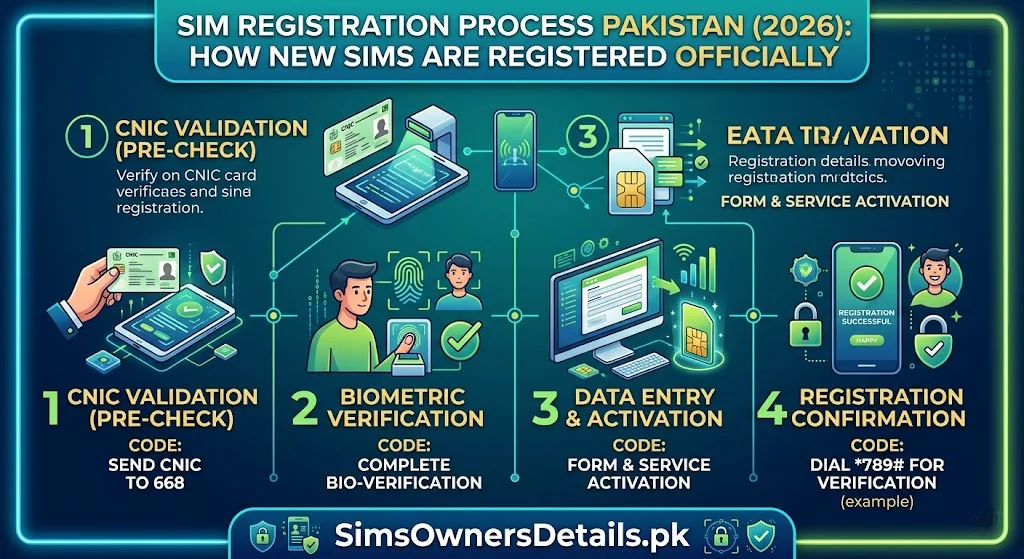
Every Pakistani mobile subscriber interacts with Pakistan’s SIM registration system — but very few understand exactly how the process works behind the scenes. Knowing the official SIM registration process is not just interesting — it is practically important. Understanding every step tells you what a legitimate registration looks like, what a fraudulent one looks like, what your legal rights are at each stage, and precisely how to verify that your own SIM registration was correctly completed.
This guide provides the most comprehensive explanation of Pakistan’s SIM registration process available in 2026 — covering the regulatory framework, the technical infrastructure, the complete step-by-step procedure from walking into a franchise to your SIM appearing in PTA’s database, and the legal requirements governing every stage.
The Core Rule: Every SIM registration in Pakistan requires: (1) a valid CNIC, (2) a biometric fingerprint matched against NADRA’s database in real time, and (3) recording of the registration in PTA’s Centralized SIM Registration System (CSRS). No exceptions permitted by law.
The Legal Foundation of SIM Registration in Pakistan
Pakistan’s SIM registration system operates under several interlocking legal frameworks:
Pakistan Telecommunication (Re-organization) Act 1996: Establishes PTA’s authority to regulate all telecom services including SIM issuance and registration standards.
PTA SIM Card Registration Regulations: PTA’s specific regulations governing how SIMs must be registered — biometric verification requirements, CNIC linkage, the 5-SIM limit per CNIC, franchise compliance obligations, and consequences for violations.
NADRA Ordinance 2000: Governs NADRA’s role as the biometric identity authority — including its obligation to provide real-time biometric verification services to operators for SIM registration.
PECA 2016 (Prevention of Electronic Crimes Act): Criminalizes fraudulent SIM registration, unauthorized use of CNIC data for SIM purposes, and unauthorized SIM issuance by franchise employees. Penalties up to 3 years imprisonment and Rs. 5 million fine.
Collective effect: These laws create a mandatory, biometrically secured SIM registration system where every SIM is traceable to a verified Pakistani identity — making Pakistan’s SIM database one of the most complete biometric registries in the world.
The Technical Infrastructure — How the System Works
Understanding the infrastructure helps you understand why the registration process works the way it does:
PTA’s Centralized SIM Registration System (CSRS):
The CSRS is PTA’s national database storing every SIM registration in Pakistan. It records:
- CNIC of the registrant
- SIM number (MSISDN)
- Network operator
- ICCID (SIM card serial number)
- Registration timestamp
- Franchise ID and location
- Biometric verification reference
- BVS status (Biometric Verification Status)
The CSRS updates in near real-time — a new SIM registered at 2 PM appears in 668 check results by approximately 2:30–3:00 PM.
NADRA’s National Identity Management System (NIMS):
NADRA’s database stores the biometric fingerprint records for all CNIC holders — used for real-time identity verification during SIM registration. The NIMS connects to franchise biometric terminals via an encrypted API.
The Operator Registration Platform:
Each operator (Jazz, Zong, Telenor, Ufone, SCO) maintains its own registration platform that:
- Receives CNIC and biometric data from franchise terminals
- Queries NADRA’s NIMS for biometric verification
- Upon successful verification, submits the registration to PTA’s CSRS
- Activates the SIM on the operator’s network
The Franchise Biometric Terminal:
The physical device at every franchise — a certified biometric scanner connected to an operator computer terminal. This device:
- Captures fingerprints with sufficient resolution for NADRA matching
- Transmits fingerprint data via encrypted connection to NADRA
- Receives match/no-match confirmation from NADRA within 5–15 seconds
- Records the registration in the operator’s system upon confirmation
For the complete picture of how Pakistan’s SIM registration data is stored and how you can access it, visit our Pak SIM data guide.
The Complete SIM Registration Process — Step by Step
Here is exactly what happens from the moment you walk into a franchise to the moment your SIM is active:
Stage 1: Customer Arrival and Initial Check (2–3 minutes)
At the counter, the franchise representative:
- Greets you and asks which service you need (new SIM, SIM replacement, etc.)
- Asks for your original CNIC
- Enters your CNIC number into their registration terminal
- The terminal immediately queries PTA’s CSRS via the operator’s backend
System checks at this stage:
- CNIC validity check: Is the entered CNIC number a valid format? Does it exist in NADRA’s database?
- SIM quota check: How many SIMs are already registered on this CNIC? If the CNIC already has 5 active SIMs, registration is blocked at this stage
- CNIC status check: Is the CNIC active (not deceased, not flagged by NADRA)?
- Fraud flag check: Has PTA placed any registration restrictions on this CNIC?
If any check fails, the representative informs you of the specific issue. If all checks pass, the process continues.
Stage 2: Biometric Fingerprint Verification (1–3 minutes)
This is the most critical stage — the step that makes Pakistan’s SIM registration system one of the most secure in the world.
Step 1: The representative asks you to place your finger on the biometric scanner. They typically ask for the right index finger first.
Step 2: The terminal captures a high-resolution fingerprint image — the scanner records ridge patterns, minutiae points, and other biometric characteristics.
Step 3: The fingerprint data is encrypted and transmitted to NADRA’s NIMS servers via a secure API connection.
Step 4: NADRA’s system compares the submitted fingerprint against all 10 fingerprints stored in your CNIC’s biometric record.
Step 5: NADRA returns one of two responses:
- MATCH CONFIRMED: Your fingerprint matches your CNIC’s stored biometric. Registration proceeds.
- NO MATCH: The submitted fingerprint does not match. Registration is blocked.
Step 6: If the first finger fails to match:
- The representative asks you to try a different finger
- Up to 3 different fingers can be attempted
- If all fail: the representative cannot proceed with registration — you may need to visit NADRA to update your biometric record
The entire biometric verification typically takes 5–15 seconds — the NADRA API is designed for near-real-time response to support high franchise throughput.
Stage 3: SIM Selection and Package Selection (2–5 minutes)
After biometric verification:
- The representative shows you available SIM options:
- SIM type: standard, micro, nano, or eSIM
- New number or specific number request (premium numbers may cost extra)
- Starter pack options with initial balance and data
- You select your preferred SIM type and starter pack
- For eSIM: you will receive a QR code instead of a physical SIM card
Stage 4: Documentation and Signature (2–3 minutes)
The representative completes the registration paperwork:
- A SIM registration form is generated — containing your name, CNIC number, SIM number, operator, date, and franchise details
- You sign the form — this is your legal acknowledgment of the SIM registration
- A copy of the completed form may be provided to you (practices vary by operator)
Legal significance of the signature: The signed registration form creates a documented record that you were physically present and consented to the registration. This form is stored by the operator and is retrievable for investigations or disputes.
Stage 5: PTA CSRS Registration (30–60 seconds, automated)
The operator’s backend system submits the completed registration to PTA’s CSRS:
- Operator sends: CNIC number, SIM number (MSISDN), ICCID, biometric reference, franchise ID, timestamp
- CSRS records the registration and assigns BVS status: “Verified”
- CSRS updates your CNIC’s SIM count from N to N+1
- The registration is now visible via 668 within 30–60 minutes
Stage 6: SIM Activation (1–5 minutes)
The operator activates the SIM on their network:
- For physical SIM: the SIM card is activated on the operator’s network
- For eSIM: the QR code is generated for you to scan on your device
- You test the SIM — make a test call, check signal, verify data connectivity
- The representative confirms your starter pack has been applied
Your SIM is now active and legal. The registration is complete.
What Happens After Registration — The Database Propagation
Understanding the post-registration timeline clarifies why 668 results update gradually:
T+0 minutes: Registration submitted to operator’s backend system.
T+5 minutes: Operator’s system confirms registration and updates its own subscriber database.
T+15–30 minutes: Operator’s batch update sends new registrations to PTA’s CSRS.
T+30–60 minutes: PTA’s CSRS is updated. The new SIM now appears in 668 check results.
T+60–120 minutes: NADRA’s NIMS receives the PTA update, syncing the SIM data to NADRA’s ecosystem (including Pak Identity app).
Practical implication: If you register a new SIM at 2:00 PM, you can verify it via 668 from approximately 2:30–3:00 PM. The physical SIM works immediately, but the 668 database confirmation lags by 30–60 minutes.
What Makes a SIM Registration Legal vs. Fraudulent
Understanding the difference protects you from participating in or becoming a victim of illegal registrations:
Legal SIM Registration — All of These Must Be True:
- ✅ The CNIC holder is physically present at the franchise
- ✅ The registrant’s actual fingerprint is scanned (live biometric, not a mould)
- ✅ The fingerprint matches the CNIC’s NADRA record
- ✅ The registrant signs the registration form with awareness of what they are signing
- ✅ The registration is submitted to PTA’s CSRS under the registrant’s CNIC
- ✅ The SIM is for the registrant’s personal use
Fraudulent SIM Registration — Any of These Makes It Illegal:
- ❌ CNIC holder is absent — registration done using only their CNIC photocopy
- ❌ Fake fingerprint used (gelatin mould, silicone replica)
- ❌ Corrupt franchise employee marks biometric as verified without completing the scan
- ❌ Registration under someone else’s CNIC without their knowledge
- ❌ A franchise employee processes the registration without the CNIC holder present
- ❌ Any bypass of the biometric requirement through technical manipulation
Under PECA 2016: Every item in the fraudulent list above is a criminal offence — both for the person presenting the fraudulent credentials and for any franchise employee who facilitates the bypass.
Your Rights During SIM Registration — What You Can Demand
As the person registering a SIM, you have specific rights:
Right 1: Demand to see what is being submitted You can ask the franchise representative to show you the information being entered — your name, CNIC number, and SIM number — before the registration is submitted.
Right 2: Receive a copy of the registration form Request a copy of the completed and signed SIM registration form. Some operators provide this automatically; others on request.
Right 3: Verify registration via 668 After registration, you can immediately verify the new SIM appeared on your CNIC via 668 (within 60 minutes). If it does not appear, return to the franchise and request confirmation of submission.
Right 4: Refuse registration without biometric If a franchise employee tries to register your SIM without biometric verification — telling you “the machine is down” and proceeding manually — you have the right to refuse and report this to PTA at 0800-55055. Manual bypass of biometric is illegal under PTA regulations.
Right 5: Request franchise ID for complaint purposes If you suspect anything irregular during registration, you have the right to request the franchise’s PTA registration number. This is needed to file a complaint.
For complete guidance on monitoring your SIM registrations after any new SIM purchase and verifying correct registration, visit our SIM information guide.
Common SIM Registration Problems and Solutions
Problem 1: Biometric Keeps Failing
Causes: Dry skin, fingerprint wear (manual workers), injury, ageing
Solutions:
- Try moistening fingertips before scanning
- Try a different finger — all 10 fingerprints are on your NADRA record
- Ask the representative to clean the scanner
- Visit NADRA Registration Centre to update your biometric record
Problem 2: “CNIC Already Has 5 SIMs”
Causes: You are at your 5-SIM limit, or unauthorized SIMs are consuming your quota
Solutions:
- Check 668 immediately to see all 5 SIMs
- If any are unauthorized: report to PTA 0800-55055 before continuing
- If all are yours and you want a new SIM: deactivate one first at the relevant operator’s franchise
Problem 3: SIM Registered But Not Working After 2 Hours
Causes: Activation delay, technical issue at operator’s backend
Solutions:
- Restart your phone
- Ensure the SIM is fully inserted in the correct slot
- Call the operator helpline (Jazz 111, Zong 310, Telenor 345, Ufone 333) with your CNIC and new SIM number
- Return to the franchise if the issue persists after helpline contact
Problem 4: New SIM Not Appearing in 668 After 3 Hours
Causes: Rare registration submission delay, or the registration was not actually submitted to CSRS
Solutions:
- Retry 668 after 4 hours
- Call the operator helpline and ask them to confirm CSRS submission status
- If not submitted: return to the franchise with your registration form as evidence and request resubmission
Problem 5: Name or CNIC Wrong on Registration Form
Causes: Data entry error by franchise employee
Solutions:
- Catch this before signing — review the form carefully
- If caught after signing: return to the franchise immediately with your CNIC for correction
- The franchise can submit a correction to PTA’s CSRS
SIM Registration for Special Cases
Replacing a Lost or Damaged SIM (Same Number):
The replacement process follows the same biometric verification steps as a new SIM — your fingerprint confirms your identity and ownership of the number. The key difference: the old SIM is deactivated and the number transfers to the new physical SIM card.
Documents required: Original CNIC. Replacement fee: nominal (Rs. 50–200 typically).
SIM Registration for Minors (Under 18):
A parent or legal guardian with their own valid CNIC can register a SIM for a minor on the parent’s CNIC. The minor’s Form-B or CNIC (if 18+) is typically not used — the SIM goes on the parent’s registration. This means the parent’s CNIC quota is consumed.
Corporate SIM Registration:
Companies register SIMs under their NTN (National Tax Number) rather than individual CNICs. An authorized company representative attends the franchise with the company’s NTN documentation and their own CNIC for biometric verification as the authorized signatory.
Frequently Asked Questions — SIM Registration Process Pakistan
Q: Is biometric verification truly mandatory for every SIM registration in Pakistan?
A: Yes — absolutely mandatory under PTA regulations. No SIM can legally be registered without a fingerprint match against NADRA’s database. Any franchise claiming to register SIMs without biometric is violating PTA regulations and should be reported.
Q: How long does the complete SIM registration process take?
A: Typically 15–30 minutes at a properly staffed corporate franchise. This includes CNIC check, biometric verification, SIM selection, paperwork, and activation.
Q: Can I register a SIM for someone else using my fingerprint?
A: No. Your fingerprint can only confirm your own identity against your own CNIC. You cannot register a SIM on another person’s CNIC using your fingerprint — the biometric must match the CNIC holder.
Q: What should I do if a franchise offers to register my SIM without biometric?
A: Refuse the registration. Report the franchise to PTA at 0800-55055 with the franchise name and location. Non-biometric SIM registration is illegal and the franchise faces license revocation.
Q: How do I know my SIM registration was submitted correctly to PTA?
A: Check 668 approximately 60 minutes after registration. Your new SIM number should appear under your CNIC. If it does not appear after 3 hours, contact the operator’s helpline.
Q: Can I register a SIM without being physically present at a franchise?
A: Not legally through any current official channel. Biometric verification requires physical presence. Some online/app-based SIM registration processes exist for eSIM but still require either a franchise visit or a verified digital identity process.
Q: My fingerprints have worn due to manual labor. How can I register a SIM?
A: Try all 10 fingers — different fingers may have clearer ridges. Moistening fingertips before scanning helps. If all 10 fail, visit NADRA to update your biometric record, then return to the franchise for SIM registration.
Q: What does the franchise do with my CNIC and biometric data?
A: The franchise submits CNIC data and biometric reference to PTA’s CSRS. Your actual fingerprint image is not permanently stored at the franchise — it is transmitted to NADRA for matching and only the match reference is retained.
Summary — SIM Registration Process Pakistan
| Stage | Duration | Key Requirement |
|---|---|---|
| CNIC entry and system checks | 2–3 min | Valid CNIC, under 5-SIM limit |
| Biometric fingerprint verification | 1–3 min | NADRA match confirmation |
| SIM selection | 2–5 min | Choose type, package, number |
| Documentation and signature | 2–3 min | Sign registration form |
| PTA CSRS submission | Automated | Appears in 668 within 60 min |
| SIM activation | 1–5 min | Works immediately on network |
Pakistan’s SIM registration process is one of the most rigorous biometric registration systems in the global telecom industry. When followed correctly, it protects every citizen by making every SIM traceable to a verified identity. Knowing this process — and knowing what it looks like when it is being bypassed — is your strongest protection against SIM fraud.
For comprehensive SIM verification, CNIC monitoring, and Pakistan’s complete mobile identity security resource, visit Sim Owner Details.
Related Guide:
- NADRA Services Complete Guide Pakistan 2026 — All Online and Offline Services
- eSIM Pakistan Setup Guide 2026 — How to Activate eSIM on Any Network
- Check SIM Ownership Pakistan 2026 — Official PTA Verification Complete Guide
- 668 CNIC Check Advanced Uses 2026 — 12 Hidden Features Most Pakistanis Don’t Know
 SIM OWNER DETAILS