
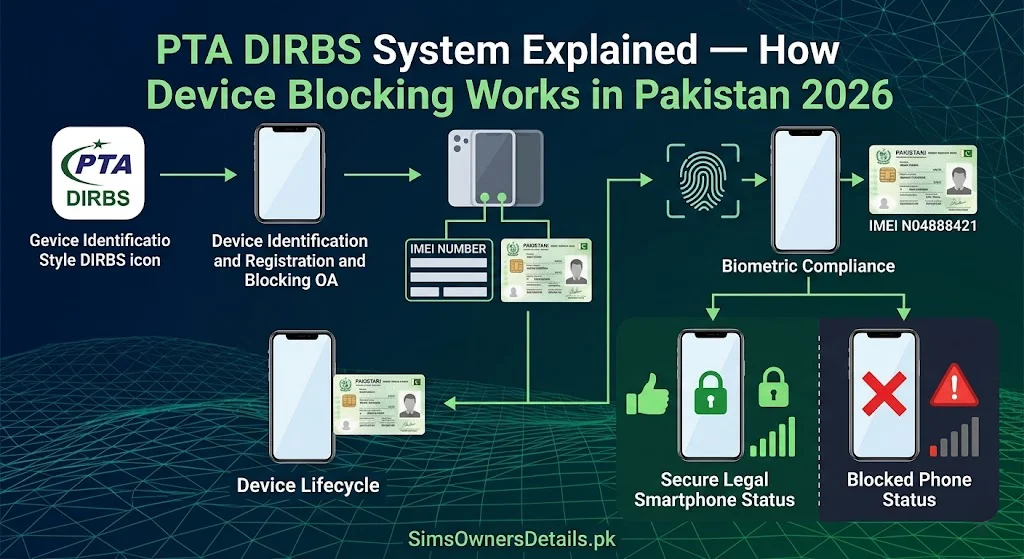
Pakistan’s DIRBS (Device Identification, Registration and Blocking System) is one of the most significant telecommunications policy initiatives in the country’s recent history. Operating alongside the SIM registration system, DIRBS creates a two-layer mobile identity framework: every SIM must be linked to a verified CNIC, and every device operating on Pakistan’s networks must have a legal, registered IMEI number.
Together, these systems mean that mobile communication in Pakistan is traceable at both the SIM (identity) level and the device (hardware) level — a powerful infrastructure for law enforcement, consumer protection, and telecom revenue recovery.
This guide explains exactly how DIRBS works, how to check whether your device is compliant, what happens when a device is blocked, and how the system interacts with Pakistan’s SIM registration infrastructure.
Quick Check: To verify your phone’s IMEI status in DIRBS right now, dial *#06# to find your IMEI number, then send it as an SMS to 8484. You will receive a response confirming whether your device is compliant, non-compliant, or blocked.
What Is DIRBS and Why Did PTA Create It?
DIRBS is a national database operated by PTA that tracks the IMEI (International Mobile Equipment Identity) numbers of all mobile devices operating on Pakistani networks. Every mobile phone has a unique 15-digit IMEI — a hardware identifier that is embedded in the device at manufacture.
The problem DIRBS was designed to solve:
Before DIRBS, Pakistan’s market was flooded with:
- Grey market phones — legally manufactured devices imported outside official channels to avoid customs and taxes
- Counterfeit phones — fake devices with cloned or invalid IMEI numbers
- Stolen phones — devices with no legitimate IMEI linkage that could not be tracked after theft
- Tax-evading imports — legally manufactured phones smuggled in to avoid import duties, costing Pakistan’s economy billions annually
The scale of the problem: At DIRBS launch in 2019, estimates suggested that over 50% of mobile devices operating in Pakistan were on the grey market or had irregular IMEI status. This represented enormous tax revenue loss and created an untraceable device ecosystem exploitable by criminals.
DIRBS solution: By registering every legitimate device’s IMEI in a national database and blocking devices with invalid or unregistered IMEIs, PTA simultaneously:
- Collects regulatory duty on all imported devices
- Creates device-level traceability for law enforcement
- Protects consumers from counterfeit devices
- Closes the grey market by removing its primary benefit (avoiding official channels)
How DIRBS Works — The Technical Framework
DIRBS operates on a simple but powerful principle: every mobile device that connects to a Pakistani network must have its IMEI verified against the national database.
The IMEI Verification Process:
Step 1 — Device connects to network: When any mobile device is powered on with a Pakistani SIM inserted, it connects to the operator’s network and transmits its IMEI as part of the standard network registration protocol.
Step 2 — IMEI sent to DIRBS: The operator’s network automatically forwards the IMEI to PTA’s DIRBS system for verification.
Step 3 — DIRBS database check: DIRBS cross-references the IMEI against its database of:
- Compliant devices — legally imported with paid duties, IMEI registered
- Non-compliant devices — not registered, potentially grey market or counterfeit
- Blocked devices — previously reported stolen, or found to have fraudulent IMEIs
Step 4 — Status response: DIRBS returns a status to the operator:
- Compliant → Device operates normally on the network
- Non-compliant → Device is flagged; the owner has a grace period to regularize
- Blocked → Device is disconnected from the network
IMEI Categories in DIRBS:
| Category | Meaning | Effect |
|---|---|---|
| Compliant | Legally imported, duties paid, IMEI valid | Full network access |
| Non-compliant (grace period) | Unregistered but operational during grace window | Works but must be registered |
| Blocked | Stolen, counterfeit, or illegal — PTA blocked | No network connectivity |
| Pending | Recently registered, awaiting full processing | Usually works normally |
How to Check Your Device’s DIRBS Status — Complete Guide
Every Pakistani mobile user should verify their device’s DIRBS status, especially when buying a second-hand phone.
Method 1: SMS to 8484 (Easiest)
Step 1: Find your phone’s IMEI number by dialing *#06# on your phone keypad. A 15-digit number will appear on screen.
Step 2: Open your SMS app.
Step 3: Create a new message addressed to 8484.
Step 4: In the message body, type your 15-digit IMEI number.
Step 5: Send the message. This service is free or charged at standard SMS rate depending on your operator.
Step 6: Receive a reply from PTA’s DIRBS system indicating your device status.
Understanding the 8484 Reply:
“Your device is PTA compliant” → Your phone is legally registered and operating correctly.
“Your device IMEI is not registered” → Your phone has not been registered in DIRBS. You need to register via the DIRBS portal.
“Your device has been blocked” → Your device’s IMEI has been blocked by PTA. No network connectivity is possible until resolved.
“Invalid IMEI” → The IMEI you entered does not match any valid format. Check you dialed *#06# correctly and count all 15 digits.
Method 2: PTA DIRBS Web Portal
PTA operates an official DIRBS verification portal:
- Open your browser and go to
dirbs.pta.gov.pk - Enter your device’s IMEI number (15 digits)
- Complete the verification challenge
- View your device’s full compliance status
This method provides more detailed information than the SMS check and is useful for documenting your device’s status for purchase records.
Method 3: Check During Purchase (Second-Hand Phone)
When buying any used phone in Pakistan, always check DIRBS before completing the purchase:
- Ask the seller to let you insert your own SIM
- Power on the device
- Send the IMEI to 8484
- Receive confirmation of compliant status before paying
A blocked or non-compliant device has significantly reduced value and may become entirely unusable on Pakistani networks.
How DIRBS Interacts with Pakistan’s SIM System
DIRBS and the SIM registration system (CSRS) work as complementary layers of Pakistan’s mobile identity framework. Understanding how they interact is important for both security and compliance:
Device + SIM = Complete Mobile Identity:
When you use your phone in Pakistan, two separate but linked identifications occur:
- Your SIM identifies you as a person — linked to your CNIC via PTA’s CSRS
- Your Device identifies the hardware — linked to IMEI via DIRBS
Law enforcement can use either or both to trace mobile activity:
- From a CNIC → find all registered SIMs (via 668/CSRS)
- From a SIM → find the device it is operating in (via DIRBS IMEI records)
- From a device → find all SIMs ever inserted (via operator CDRs and DIRBS logs)
SIM Fraud and Device Tracking:
When a criminal registers a fraudulent SIM on your CNIC and uses it in a device, DIRBS records the IMEI of the device. This means:
- Even if the SIM is eventually blocked, the device IMEI is logged
- FIA investigators can trace the device used with a fraudulent SIM
- The device can be identified if it appears on the network again with any SIM
This two-layer traceability is why organized SIM fraud operations typically use low-cost, disposable devices — they know the device IMEI creates a traceable record that can lead back to them.
For a complete understanding of how Pakistan’s SIM data infrastructure works alongside DIRBS, visit our Pakistan SIM database guide.
How to Register an Unregistered Device in DIRBS
If your 8484 check shows your device is not registered, you need to regularize it through PTA’s Device Registration System (DRS):
For Personally Imported Devices (Brought from Abroad):
If you personally brought your phone from another country:
Step 1: Go to dirbs.pta.gov.pk
Step 2: Select “Register Device” or “DIRBS Regularization”
Step 3: Log in with your CNIC and phone number
Step 4: Enter your device’s IMEI and model details
Step 5: Pay the applicable regulatory duty (varies by device value — calculated by the portal)
Step 6: Receive confirmation of registration
Step 7: Verify via 8484 within 24 hours
Grace period for travelers: Passengers entering Pakistan can register one personal device duty-free under PTA’s traveler exemption policy. This must be done through the DIRBS traveler portal at customs or within a short window of arrival.
For Locally Purchased Devices Showing as Unregistered:
If you bought a device in Pakistan from an authorized dealer and it shows as unregistered, the issue may be with the dealer’s registration:
Step 1: Return to the dealer with your purchase receipt
Step 2: The dealer is responsible for ensuring locally sold devices are DIRBS-compliant
Step 3: If the dealer is unresponsive, file a complaint with PTA at 0800-55055
Step 4: PTA can investigate unauthorized dealers and enforce DIRBS compliance
What Happens When PTA Blocks a Device via DIRBS
When PTA blocks a device’s IMEI in DIRBS, the consequences are immediate and hardware-level:
Immediate Effects:
- The device cannot connect to any Pakistani mobile network (Jazz, Zong, Telenor, Ufone, SCO)
- No calls, no data, no SMS from any SIM inserted in the device
- The block applies to ALL SIMs — not just one operator
- Wi-Fi still works (DIRBS only affects cellular network connectivity)
- The physical device is not damaged — only cellular network access is blocked
What Callers Hear:
If someone calls a number currently in the blocked device, the call connects normally until the SIM in the device is determined to be unroutable. The caller experiences the same response as calling any unreachable SIM.
Causes of DIRBS Device Blocking:
- Device reported stolen by original owner
- Device IMEI found to be cloned or counterfeit
- Device imported through illegal channels after enforcement action
- Court order blocking a specific device as part of investigation
How to Unblock a Device:
If you believe the block is an error:
- Check your IMEI on the DIRBS portal for the specific block reason
- Call PTA at 0800-55055 and explain your situation
- If you are the legitimate owner: provide purchase receipt, CNIC, and any other ownership documentation
- PTA investigates and can lift the block if ownership is confirmed
If the device was reported stolen (and you are the legitimate buyer):
- This is a civil matter between you and the seller
- File an FIR against the seller for fraud (selling stolen property)
- PTA may require a court order to unblock a device in a criminal case
If the device has a cloned IMEI (counterfeit): This block cannot typically be lifted — the device fundamentally does not have a legitimate hardware identity. This is why buying counterfeit phones is a significant financial risk in Pakistan.
DIRBS and Second-Hand Phone Market — Buyer Protection Guide
Pakistan’s second-hand phone market is large and largely informal. DIRBS has created clear buyer protections that savvy buyers must use:
Before Buying Any Second-Hand Phone:
Check 1: IMEI via 8484 Always verify the device IMEI is compliant before purchase. A non-compliant or blocked phone is worth significantly less than a compliant one and may become completely unusable.
Check 2: Physical IMEI vs Software IMEI On Android: Settings → About Phone → IMEI Information On iPhone: Settings → General → About → IMEI Compare the software IMEI with the physical IMEI printed on the box or back of the device. If they do not match — the phone has a cloned IMEI. Do not buy.
Check 3: Verify the phone is not reported stolen The 8484 service will indicate if a phone has been reported stolen and blocked by its original owner.
Check 4: Request purchase receipt Ask the seller for an original purchase receipt. Legitimate sellers of legally imported devices have this documentation.
Red Flags When Buying Second-Hand:
- Seller refuses to let you check IMEI before purchase
- Price is significantly below market value for the model
- Seller is evasive about where the phone was purchased
- Phone has no original box or accessories
- IMEI on phone body differs from IMEI shown in settings
For an understanding of how device IMEI data connects to Pakistan’s broader SIM and mobile identity verification infrastructure, explore our Pak SIM data guide.
Frequently Asked Questions — PTA DIRBS System Pakistan
Q: Does DIRBS affect Wi-Fi calling or internet via Wi-Fi?
A: No. DIRBS only blocks cellular network connectivity. A DIRBS-blocked device can still make Wi-Fi calls via apps (WhatsApp, Skype) and use internet via Wi-Fi networks.
Q: If I buy a phone abroad and bring it to Pakistan, do I have to pay duty?
A: One device per traveler per trip can typically be brought in duty-free under PTA’s traveler exemption, provided it is registered through the DIRBS traveler portal within the allowed window. Additional devices or commercial quantities require full import duty payment.
Q: Can a cloned IMEI phone ever be made DIRBS compliant?
A: No. A device with a cloned (fake) IMEI cannot be legitimately registered in DIRBS because it does not have a real hardware identity. The only solution is to stop using the device on Pakistani networks.
Q: Does DIRBS block only the SIM or the entire phone?
A: DIRBS blocks the device — the IMEI. This means no SIM works in a DIRBS-blocked phone on Pakistan’s networks, regardless of which SIM is inserted or which operator is used.
Q: How does PTA know if a phone was stolen?
A: When a phone is stolen and the owner reports it, they can file a report with their operator and PTA, providing the device’s IMEI. PTA adds the IMEI to the DIRBS blocked list. The phone becomes unusable on Pakistani networks within hours of the block being applied.
Q: If I sell my phone in Pakistan, should I inform PTA?
A: There is no mandatory notification requirement when selling a phone within Pakistan. However, when you sell, ensure you deregister any SIM association and inform the buyer to re-verify DIRBS status after taking possession.
Q: Can DIRBS identify the physical location of a device?
A: DIRBS records which operator’s network a device connected to and when. Location data is not part of DIRBS itself, but when combined with operator CDRs (call detail records), investigators can narrow down a device’s location history. This capability is available to law enforcement with appropriate legal authority.
Q: Does DIRBS apply to tablets and iPads?
A: Yes. Any device with a SIM slot and an IMEI that operates on Pakistani cellular networks is subject to DIRBS — including tablets, iPads with cellular, mobile broadband routers, and smartwatches with eSIM.
Summary — PTA DIRBS System Pakistan
| Topic | Detail |
|---|---|
| Full name | Device Identification, Registration and Blocking System |
| Operated by | PTA |
| Purpose | Legal IMEI verification for all devices on Pakistani networks |
| Check method | SMS IMEI to 8484, or dirbs.pta.gov.pk |
| Status types | Compliant, Non-compliant, Blocked, Pending |
| Block effect | No cellular network on any operator |
| Wi-Fi effect | None — Wi-Fi still works |
| Registration method | DIRBS portal for imported devices |
| Interaction with SIM | Complementary — together identify device + user |
DIRBS and Pakistan’s SIM registration system together form the most comprehensive mobile traceability infrastructure in the country’s history. For mobile users, the practical takeaways are simple: verify your device’s IMEI is compliant, always check DIRBS before buying a second-hand phone, and report stolen devices immediately to protect your IMEI from being exploited.
For Pakistan’s most complete SIM and device verification resource library, visit Sim Owner Details.
Related Guide:
 SIM OWNER DETAILS